Summary: in this tutorial, you will learn how to use the Oracle GRANT ALL PRIVILEGES statement to grant all privileges to a user.
Granting all privileges to a new user #
First, create a new user called super with a password by using the following CREATE USER statement:
CREATE USER super IDENTIFIED BY oracle;Code language: SQL (Structured Query Language) (sql)The super user created. Note that you should use a secure password instead of oracle.
Second, use the GRANT ALL PRIVILEGES statement to grant all privileges to the super user:
GRANT ALL PRIVILEGES TO super;Code language: SQL (Structured Query Language) (sql)Third, log in to the Oracle Database as the super user and query the super user’s privileges:
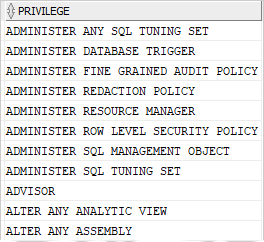
SELECT * FROM session_privs
ORDER BY privilege;Code language: SQL (Structured Query Language) (sql)
Here is the partial output:
Granting all privileges to an existing user #
To grant all privileges to an existing user, you just need to use the GRANT ALL PRIVILEGES statement. For example, the following statement grants all privileges to the user alice:
GRANT ALL PRIVILEGES to alice;Code language: SQL (Structured Query Language) (sql)Summary #
- Use the Oracle
GRANT ALL PRIVILEGESstatement to grant all privileges to a user.
Was this tutorial helpful?

